
FOR MUSEUMS AND CULTURAL SITES

Ogni visitatore ha le sue domande.
Risponde il vostro museo.

An assistant visitors can talk to as they would to a person, from their phone and in their own language. It answers with content your curators have checked. And when it doesn't know something, it says so.

Which works by Ghirri can I see?

The exhibition The Large Glass at MAXXI includes Luigi Ghirri's work titled “Modena”, made in 1978.

I'm in the café, how do I get to The Large Glass?

  1. From the Café (Level 0), go through to the Hall.
  2. Take the Hall lifts, near EduLab 1 and the Exhibition Space.
  3. Go up to Level 1: you will arrive directly in Gallery 4, where The Large Glass is on show.
Real answers from the assistant in use at MAXXI in Rome, translated from Italian.
HOW IT ANSWERS

We won't tell you how it talks.
We'll let you read it.

The same question, for different people

Anyone who prefers simpler language can ask for it. The answer changes form, the content stays the same.

What does the work Modena represent?

Standard answer

The work Modena, part of Luigi Ghirri's Still Life series, is a reflection on photography itself. In this work, Ghirri rephotographs a daguerreotype, creating a mirrored composition in which the “photography of photography” becomes, as he himself described it, a magical moment of temporal coincidence.

The image shows his interest in objects and traces of the past, using the strong, contrasting colour typical of the Polaroid technique to play with alternating planes, cropping and flattening reality within the frame.

In easy-to-read language

This text is about a photo called Modena. It is part of a series called Still Life by Luigi Ghirri.

In this photo, Ghirri photographs another very old photo (a daguerreotype). This creates a special effect: a photo of a photo. Ghirri says it is a magical moment where time meets.

The photo shows that Ghirri likes objects and things from the past. He uses strong, contrasting colours, typical of Polaroid photos. He plays with planes: he cuts and flattens reality in the photo.
A route that takes account of who is asking

To the same question, a moment earlier, it had pointed to the lifts. The visitor adds that they are claustrophobic, and the route changes.

I'm in the café, how do I get to The Large Glass, given that I'm claustrophobic?

  1. From the Café (Level 0), go through the Hall to Gallery 1.
  2. In Gallery 1, take Main Staircase 1.
  3. Go up to Level 1: you will arrive in Gallery 3.
  4. Cross Gallery 3 to reach Gallery 4, where The Large Glass is on show. Route without lifts, as requested.

When it doesn't know, it says so

It doesn't reassure at random and it doesn't make things up. It says what is on record, flags the doubt and points to who can help.

I have epilepsy, are there any dangerous works?

There are no specific warnings for photosensitivity or epilepsy in the general information and in the descriptions of the exhibitions currently on show.

Some works on the programme include video installations, such as Songs and Cries, and film programmes, such as the Flaminio Film Festival, which may involve changes of light or bright projections.

For detailed information on lighting conditions and safety before your visit, you can contact MAXXI's Public Engagement office. […]

Real answers from the MAXXI assistant, taken from the September 2026 demonstration and translated from Italian. Some are slightly shortened. The exhibitions mentioned were those on show at the time.

HOW WE SUPPORT VISITORS

Many different assistants,
one conversation.

Behind the scenes, specialised assistants each have their own task. Visitors don't have to choose them or know about them: they write their question, and it reaches the one that can answer. You switch on only the ones you need.

MAGELLANO

Finding the way

It guides visitors from one point of the museum to another using the names of spaces or services, while taking the guide's needs into account.

“I'm in the café, how do I get to the exhibition?”

LEONARDO

Understanding the works

It talks about works, artists and exhibitions, starting from your catalogues and your own texts.

“Which postwar artists are in this exhibition?”

JEEVES

Planning the visit

It gives practical information: opening hours, tickets, events and services.

“What exhibitions are on today? Can my guide dog come in?”

ESOPO

Understanding in your own way

On request it rewrites the answer in easy-to-read language, or in descriptive language with tactile and physical references for people who cannot see the works.

“Can you explain that more simply?”

JUNG

Having your say

It gathers visitors' opinions and impressions, so the museum knows what they liked and what didn't work.

“Lovely exhibition, but the labels are hard to read.”

SALOMONE

Speaking your own language

It replies in the language visitors write in. It has been tested in Italian, English, French, Spanish, German, Chinese, Hindi, Arabic, Japanese and many more.

“Sind Assistenzhunde erlaubt?”

NOT A GPT FOR MUSEUMS

Not all chatbots are alike.
The difference is where the answers come from.

Scripted chatbot

Reliable, but rigid

How you ask
You have to ask the “right” questions, the ones it expects.
Where the answer comes from
Texts written in advance by staff, one by one.
If it doesn't know the answer
It can't adapt: the conversation stops.

Generic AI, such as GPT

Fluent, but unpredictable

How you ask
You can ask anything, freely.
Where the answer comes from
External sources too, which the museum doesn't control.
If it doesn't know the answer
It may give a convincing, wrong answer.

Isagog

Free conversation, controlled knowledge

How you ask
You talk freely, as you would to a person.
Where the answer comes from
The museum's knowledge, checked by your curators.
If it doesn't know the answer
It says so, and points to who can help.
ALREADY IN USE

At MAXXI in Rome,
tested by people who face barriers.

With the MAXXIperTUTTI project, funded by Italy's recovery plan (PNRR) to remove physical and cognitive barriers, we brought the assistant to a national museum. Before launch, we put it to the test with the people who would really use it.

Three working groups
People with cognitive disabilities and neurodivergence, deaf people, people with visual impairments.
On real exhibitions
The assistant answers on the content of real exhibitions, not on a test archive.
In the museum's hands
The museum received the tools to update content and follow conversations without depending on us.
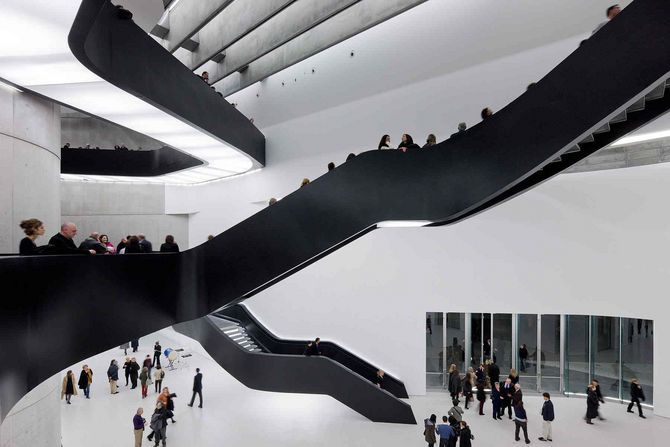
Visitors in the MAXXI atrium, crossed by its suspended black staircases
FOR MUSEUM STAFF

You don't need an IT specialist.
You need someone who knows the museum.

  1. 01

    Upload your materials

    Catalogues, exhibition texts, brochures: what you already have. The system draws out works, authors and descriptions.

  2. 02

    The curator approves

    Nothing reaches visitors without being checked by someone at the museum. If something is wrong, you fix it, and from then on it is right.

  3. 03

    The visitor asks

    From their phone, by writing a question. There is nothing to learn, and nobody asks them who they are.

  4. 04

    You listen

    You see what visitors ask and read their opinions. So you discover what they are really looking for.

We take care of the technical side. We set the system up on your museum and train your staff, who can then manage the content on their own.

IDEAS TO DEVELOP TOGETHER

From here on,
you decide where to go.

These are not ready-made features: they are possibilities that grow out of what the system can already do, and that we can build together with a museum, starting from its needs.

  • Preparing the visit from home

    Before setting off, visitors find out what to see, how to get there and what to expect.

  • “I only have an hour”

    A route built around the time available and what interests that person.

  • Schools and families

    Content told in a way that suits each age, to prepare a school trip or let children lead the way.

  • What isn't on display

    Giving a voice to works in storage and to archives the public can't encounter today.

  • Visitors' questions as a compass

    A regular summary for curators and directors: what the public asks, can't find or doesn't understand.

  • A local network

    Several museums in a city or region, with one assistant that also suggests the next stop.

FREQUENT QUESTIONS

What museums ask us.

Do we need technical staff?

No. We handle the setup. The museum needs someone who knows the content: we train them to upload and correct it.

Can it make up answers?

That is the risk we built the system to avoid. Answers start from knowledge checked by the museum and, if some information is missing, the assistant says so instead of filling the gap. No AI is infallible: that's why staff can read the conversations and correct things at the source.

Does it replace guides and educators?

No, it works alongside them. It answers the questions nobody can answer at that moment, and gives staff a picture of what visitors are looking for.

What happens to visitors' data?

Visitors don't have to register and aren't profiled: the assistant adapts to what they ask in the conversation. The system is designed in line with GDPR and the AI Act and can run on open models, without depending on the big AI providers.

How much does it cost?

It depends on the size of the museum, the features you switch on and where the service runs. You can start with a single feature. We discuss it at the first meeting, starting from your case.

Can it be funded through a grant?

The MAXXI project was funded by Italy's recovery plan. If you are preparing a grant application, we can give you a description of the project and its costs to include.

30 MINUTES, NO COMMITMENT

See it
for yourselves.

The best way to understand what it is, and what it isn't, is to see it working. You need no technical knowledge and nothing to prepare.

In the meeting

  1. 01You tell us about your museum and your visitors.
  2. 02We show you the assistant at work, and you can ask it your own questions.
  3. 03Together we see where it would make sense to start.
Prefer to write? info@isagog.com ↗

Ask for a demonstration.

We reply within one working day to set a date and time.

Describing the case is enough; there is no need to include confidential data.

This prototype prepares a draft email. You can review it and send it from your own mail client. No data is sent by the form.

Privacy and analytics

We'd like to understand how the site is used: which pages you visit, where you come from, which device you use. We measure this with PostHog (EU) and Cloudflare only if you agree. No personal profile, no advertising.

More details

We collect the paths of pages visited and their order, visit times and duration, the referring site, approximate country (derived from the IP address), and basic browser and device information. Cloudflare also measures page performance.

We do not record form contents, individual clicks, or session videos. PostHog does not create a personal profile and keeps an anonymous identifier only for this browser tab. We save your choice in the browser for future visits.

If you decline, the site works exactly the same. You can change your mind at any time from “Privacy preferences” at the bottom of every page.